Master Your Brand: The Ultimate iPhone 16 Tough Case Mockup PSD
In the competitive world of e-commerce and digital marketing, visual presentation is not just a luxury—it is a necessity. For designers, entrepreneurs, and creators, the ability to visualize a product before it goes into production is a game-changer. We are thrilled to offer high-quality, editable PSD mockups and digital mockup templates designed specifically for your creative projects. Whether you are launching a new accessory line or creating promotional content, having access to a realistic iPhone Case Mockup can define the success of your visual strategy.
Today, we dive deep into the utility and application of the iPhone 16 Tough Case mockup. This tool is engineered to bridge the gap between your digital artwork and the physical product. By utilizing these templates, you can ensure that your designs look professional, consistent, and market-ready without the overhead costs of physical photography. Let us explore how this specific mockup can elevate your workflow and where it fits into the broader ecosystem of digital design assets like the Boho Smartphone Mockup and Elegant Phone Case Mock-Up.
Understanding the iPhone 16 Tough Case Mockup
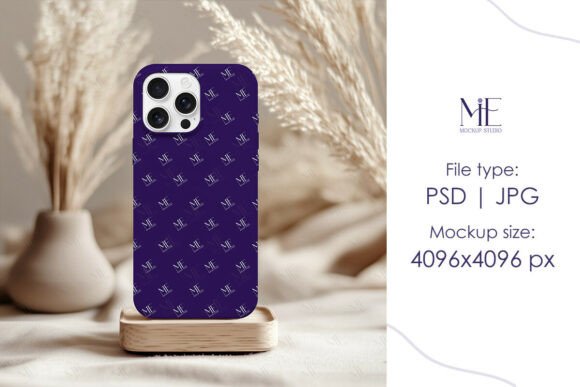
The iPhone 16 Tough Case represents a specific style of protective accessory known for its durability and robust build. Unlike slim silicone skins, a tough case implies a rugged, multi-layered protection system. When you use an iPhone 16 Tough Case Mockup PSD, you are working with a template that accurately depicts these physical characteristics—beveled edges, button textures, and the substantial grip of the device.
Why does this matter? Context matters in design. If you are selling heavy-duty protection, your mockup needs to look heavy-duty. A generic flat lay might not capture the depth of a rugged case. This specific mockup allows you to place your artwork onto a 3D-rendered object that mimics real-world lighting and shadows. This creates a hyper-realistic representation that builds trust with your customers.
Key Features of the Digital Asset
When you purchase and download this digital asset, you are receiving a file package curated for professional use. The primary file is a PSD (Photoshop Document) that utilizes Smart Object layers. This is the heart of the mockup technology.
- Editable Smart Object Layers: The file contains fully editable Smart Object layers. This means you do not need to warp your design manually to fit the curves of the phone. You simply paste your flat artwork into the designated layer, and Photoshop automatically maps it to the 3D surface.
- High-Resolution Output: The package includes a high-resolution JPG file (4096x4096 pixels). This exceptional quality ensures that your images remain sharp whether they are viewed on a massive desktop monitor or cropped for mobile social media feeds.
- Watermark-Free Assets: The images provided are clean canvases. There are no distracting watermarks or text overlays, allowing you to use the final output immediately for commercial or personal projects.
The Role of Smart Objects in Modern Design
The term "Smart Object" is frequently used in the industry, but for those new to the field, it can sound technical. Simply put, a Smart Object is a container within a Photoshop file that preserves the original source content of an image. When you use the Phone Cover Mockup Smart Object method, you are working non-destructively.
Imagine you have a intricate floral pattern for a Boho Smartphone Mockup. If you were to resize and warp this pattern manually on a curved layer, you would lose pixel quality and likely distort the design. With the Smart Object layer, the mockup file handles the transformation. You double-click the layer, place your artwork, and save. The main file updates automatically, applying the correct perspective and lighting to your pattern. This ensures that the "professional finish" we strive for is achievable even for those with intermediate Photoshop skills.
Comparing Styles: From Boho to Rugged
Different products require different aesthetic presentations. The versatility of PSD mockups allows you to switch contexts easily. While our focus is the iPhone 16 Tough Case, it is helpful to understand where this fits in the spectrum of available templates.
For instance, a Boho Smartphone Mockup typically features earthy tones, natural lighting, and perhaps props like dried flowers or linen fabrics. It targets a demographic that appreciates artisanal, vintage, or nature-inspired aesthetics. Conversely, an Elegant Phone Case Mock-Up might feature marble surfaces, gold accents, and studio lighting, targeting luxury brands and high-end fashion accessories.
The iPhone 16 Tough Case mockup sits in the functional and modern category. It appeals to a broad audience including outdoor enthusiasts, tech-savvy professionals, and parents looking for durability. The visual language here is clean, structural, and focused on the device's capability.
Practical Application: Who Benefits?
The utility of the iPhone Case Mockup, iPhone 16 Tough Case extends across various professional domains. It is not limited to graphic designers alone.
For E-commerce Store Owners
If you run a print-on-demand store or sell custom phone accessories, you cannot wait for physical samples of every design to take product photos. A mockup allows you to upload hundreds of designs to your store instantly. You can create a cohesive catalog featuring the iPhone 16 Tough Case Mockup PSD, ensuring that every product page looks uniform and high-quality.
For Graphic Designers and Freelancers
Presentation is key when pitching to clients. Instead of sending a client a flat JPG of a pattern, you can present it on a realistic device. Using the Phone Cover Mockup Smart Object feature, you can show clients exactly how their logo or artwork will look in a real-world scenario. This adds value to your service and helps clients visualize the end product, increasing the likelihood of approval.
For Social Media Managers
Content for platforms like Instagram, Pinterest, and TikTok requires high-impact visuals. A flat image often gets lost in the feed. A 3D rendered iPhone Case Mockup adds depth to your posts. You can create lifestyle images, announcement graphics for new launches, or "design of the day" features that engage your audience.
Step-by-Step: How to Use Your Mockup
We are committed to providing tools that are accessible. The process of using this digital download is streamlined to save you time. No physical items will be shipped; this is an instant digital download. Here is the workflow to get you started right away:
- Purchase and Download: After checkout, you will receive instant access to the files. Download the PSD file to your computer.
- Open in Photoshop: Launch Adobe Photoshop and open the downloaded iPhone 16 Tough Case Mockup PSD file.
- Locate the Smart Object: In the Layers panel, look for the layer labeled "Smart Object," "Place Design Here," or a similar designation. It often has a small icon in the corner.
- Edit the Layer: Double-click on the Smart Object layer thumbnail. This will open a new window (usually a .PSB file) showing a flat canvas.
- Insert Your Design: Paste your artwork into this new window. You can resize and position it to cover the canvas area completely.
- Save and Close: Save the changes in the Smart Object window (Ctrl+S or Cmd+S) and close it. Return to the main mockup file, and you will see your design seamlessly integrated onto the iPhone 16 Tough Case.
- Export: Finally, save your image as a JPG or PNG to use in your marketing materials or store.
Evaluating Quality and Expectations
When sourcing mockups online, quality varies significantly. A low-quality mockup will have poor lighting, unrealistic textures, or low resolution, which can actually damage your brand's reputation. When evaluating the iPhone Case Mockup, iPhone 16 Tough Case, consider the following:
- Resolution: Does the file support high-definition output? Our template offers 4096x4096 pixels, ensuring your designs look crisp even when zoomed in.
- Lighting and Shadow: Does the mockup have realistic drop shadows and highlights? These elements are crucial for making the object look like it exists in a physical space.
- Editability: Is the background easily changeable? A versatile mockup allows you to change the color of the case or the background environment to match your brand palette.
It is important to manage expectations regarding the software required. These advanced mockups generally require Adobe Photoshop to function correctly with Smart Objects. While some basic editing can be done in other software, the full "seamless integration" experience relies on the Photoshop ecosystem.
Conclusion: Elevating Your Visual Strategy
The iPhone 16 Tough Case is more than just a protective shell; it is a canvas for expression. For creators and business owners, the iPhone Case Mockup is an indispensable asset that saves time, reduces costs, and enhances the visual appeal of your products.
Whether you are utilizing the Elegant Phone Case Mock-Up for a jewelry brand or the iPhone 16 Tough Case Mockup PSD for a tech startup, the principle remains the same: high-quality presentation drives engagement. By leveraging these digital tools, you ensure that your designs are not just seen, but appreciated in their best light. We invite you to explore these templates and transform your creative workflow today.