Streamlining Your Creative Process with American Pride and Sublimation Mug Wraps
For creators, small business owners, and hobbyists working within the sublimation printing niche, efficiency is not merely about speed; it is about the reliability of the final product. When working with patriotic themes, specifically those centered on American Pride, the visual fidelity of red, white, and blue is paramount. This is where a high-quality sublimation mug wrap becomes a critical asset in your digital inventory. Understanding how to integrate these digital files into your existing workflow can save hours of troubleshooting and significantly elevate the perceived value of your merchandise.
The Technical Foundation: What You Are Actually Purchasing
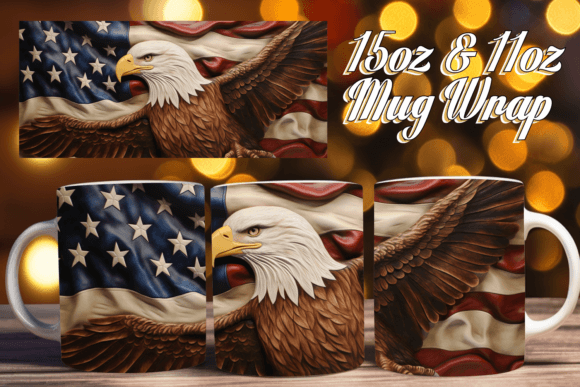
When you acquire an American Pride and Sublimation Mug Wrap download, you are investing in a pre-optimized template designed to streamline the production phase. It is vital to view this file not as a standalone image, but as a production-ready component. The download typically includes PNG files specifically sized for standard 11oz and 15oz mugs. These files are set to 300 DPI (dots per inch), which is the industry standard for high-resolution printing. If you attempt to use lower-resolution files, you risk pixelation, particularly on curved surfaces where the image stretches during the heat press process.
However, it is crucial to address the prerequisite of knowledge. These files are digital assets, not physical products. To effectively utilize this file, it is essential to have a strong grasp of the concept of sublimation. This includes understanding the chemistry of sublimation inks, the requirement for polyester-coated substrates, and the physics of heat and pressure. Before making a purchase, please ensure that you have the required software and equipment at your disposal. The seller’s support is typically exclusive to addressing file-specific issues—such as corrupt downloads or incorrect dimensions—rather than offering guidance on how to operate a heat press or design software.
Integration into the Design Workflow
The primary value of using a pre-sized wrap is the elimination of the "guessing game" regarding dimensions. In a busy workflow, resizing and adjusting canvas sizes in software like Adobe Photoshop, Illustrator, or Affinity Designer consumes valuable time. By utilizing the provided PNG templates, you bypass the setup phase and move directly to customization.
Here is how this fits into a practical creative process:
- Layering and Customization: Because the files are high-resolution PNGs, they often come with transparent or easily removable backgrounds. This allows you to layer the American Pride graphics over different textures or combine them with other elements, such as personalized text for veterans, holiday events, or corporate gifts.
- Color Management: Sublimation printing can sometimes shift colors during the heat transfer. A file optimized for sublimation usually accounts for this, but you should always perform a test print. The vibrant nature of American Pride designs—often featuring deep navy blues and bright reds—requires accurate color profiles (CMYK) to ensure the final mug does not look dull.
- Software Compatibility: Since the files are PNGs, they are universally compatible. You do not need specific plugins to open them. They can be imported directly into Sawgrass PrintManager, Epson drivers, or standard design software.
Production and Quality Control
Once the design is finalized in your software, the file moves from the digital workspace to the physical production line. The interaction between the digital file and the physical mug is where many errors occur. An American Pride and Sublimation Mug Wrap is designed to fit the curvature of specific mug sizes. If the file is not applied correctly, the design may spiral or warp.
Consider these implementation tips for the execution phase:
- Substrate Preparation: Ensure your 11oz or 15oz mugs are clean and free of lint or oil. Even a fingerprint can cause a "ghosting" effect where the design appears blurry.
- Heat Tape Application: When wrapping the printed transfer around the mug, use heat-resistant tape to secure the ends. The transfer must be tight against the ceramic surface. Any air gaps between the paper and the mug will result in white patches in the final print.
- Time and Temperature: While the file provides the visual, the equipment provides the execution. Adhere strictly to the heat press settings recommended for your specific ink and mug coating (typically around 400°F for 4-6 minutes, though this varies by equipment).
Business Application and Inventory Management
For entrepreneurs and small business owners, the utility of these files extends beyond a single project. An American Pride theme is evergreen in the US market, peaking around Independence Day, Veterans Day, and Memorial Day, but selling steadily year-round to patriots and tourists.
Treating these digital files as inventory assets allows for better planning:
- Batch Processing: Use the files to print multiple transfers at once. Sublimation is most efficient when done in batches. You can print a stack of 11oz transfers and a stack of 15oz transfers, then press them as orders come in or as you build stock for a craft fair.
- Mockups for Marketing: Before printing a single physical mug, use the high-resolution PNG files to create digital mockups. This allows you to list the product on platforms like Etsy, Shopify, or Amazon and gauge interest without holding physical inventory.
- Upselling Opportunities: Having a consistent design file allows you to easily expand your product line. If the American Pride design sells well on a mug, the same high-resolution file can often be adapted for mouse pads, coasters, or t-shirts, provided you have the correct blanks and equipment.
Troubleshooting and Long-Term Usability
Even with high-quality files, issues can arise. It is important to distinguish between a file error and a user error. If the image looks pixelated on your screen, it is likely a software preview issue or the file was downloaded incorrectly. However, if the image prints with banding lines, that is usually a hardware issue (clogged print heads) rather than a problem with the American Pride and Sublimation Mug Wrap file itself.
Should you encounter challenges with the download or the file integrity, reaching out to the creator is the correct step. Professional sellers are there to assist with file-specific issues. However, for issues regarding the "orange peel" texture on mugs, colors looking dull, or paper sticking to the mug, you must consult your equipment manual or sublimation communities, as these are operational variables outside the scope of the digital file.
By treating the sublimation mug wrap as a professional tool within a larger system, you ensure that your creative output remains consistent, your workflow remains efficient, and your final products reflect the quality your customers expect.