How a UGC Media Kit Canva Template Elevates Your Creator Career
In the dynamic world of digital marketing, User-Generated Content (UGC) has become a cornerstone for authentic brand storytelling. As a UGC creator, your ability to produce compelling content is your primary skill. However, translating that skill into a sustainable business requires a second, equally important talent: professional self-presentation. This is where a well-crafted media kit transitions from a nice-to-have to an essential business tool. A UGC Media Kit Canva Template is designed specifically to bridge this gap, offering a structured, visually appealing way to showcase your value to potential brand partners.
Understanding the UGC Media Kit: More Than Just a Portfolio
A common misconception is that a media kit is simply a digital portfolio of your best work. While it does include examples, its true purpose is far more strategic. Think of it as your professional resume, business card, and sales pitch combined into one polished document. It communicates who you are, what you offer, and why a brand should invest in collaborating with you. For UGC creators, who often work as independent contractors, this kit is the first formal point of contact in a business negotiation. It establishes credibility, sets clear expectations, and frames the conversation around your professional services.
The significance of a dedicated UGC media kit lies in its specificity. Generic influencer kits might focus heavily on follower counts and engagement rates. A UGC-centric template, however, highlights what brands truly seek in this niche: the quality of your content creation, your understanding of brand voice, your ability to drive conversions through authentic storytelling, and your reliability. It answers the key questions a brand manager has before they even reach out.
Anatomy of an Effective UGC Media Kit Template
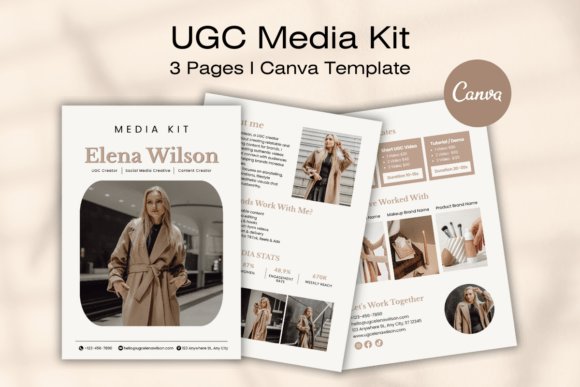
A comprehensive template, like the 3-page Canva design mentioned, is meticulously structured to guide the brand through your professional profile. Each section serves a distinct purpose in building a compelling case for your services.
The Cover Page: Making a Powerful First Impression
This is your visual handshake. A modern, minimal design ensures your professionalism shines through without distracting from the content. It typically features your name or creator handle, a high-quality photo of you, and a clear title like "UGC Creator Media Kit." The goal is immediate recognition and a positive initial perception. A cluttered or amateurish cover can undermine the quality of the content inside.
The About Me & Why Brands Work With Me Sections: Building Connection and Trust
This is where you move beyond the numbers and tell your story. The "About Me" section humanizes you, sharing your niche, your content philosophy, and what drives your creativity. It answers the "who" behind the content. The subsequent "Why Brands Work With Me" section directly addresses the brand's needs. Here, you articulate your unique value proposition. Do you specialize in unboxing videos that highlight product features? Are you skilled at creating relatable, "day-in-the-life" content that seamlessly integrates a product? This section should list clear, benefit-driven points such as "High-converting authentic storytelling," "Quick turnaround times," or "Expertise in platform-specific trends."
Showcasing Your Professional Data: Social Media Stats and Services
Transparency builds trust. The "Social Media Stats" page presents your relevant metrics in a clean, easy-to-digest format. This includes platform-specific followers, average engagement rates, and audience demographics. For UGC, where the content is often used for brand-owned channels, metrics like video completion rate or audience sentiment can be even more powerful than follower count.
The "Services And Rates" page is the core of your business proposal. This is where you demystify your offerings. Clearly list the types of content you create—short-form videos, static images, product reviews, tutorials—and the deliverables included in each package. Being upfront about your pricing structure (e.g., per video, package rates) or stating "Pricing available upon request" demonstrates professionalism and helps qualify serious inquiries. It prevents time wasted on negotiations with brands whose budgets don't align with your rates.
Social Proof and The Call to Action: Closing the Loop
The "Brands I’ve Worked With" page provides powerful social proof. Featuring logos of recognizable brands you've collaborated with acts as a trust signal, validating your experience and the quality of your work. Even if you're new, you can include logos of smaller brands or notable projects.
Finally, the "Let's Work Together" page is your clear call to action. It consolidates all your contact information—professional email, social media handles, and website—making it effortless for a brand to take the next step. A friendly, inviting closing statement reinforces your eagerness to collaborate.
The Practical Advantages of Using a Canva Template
Opting for a pre-designed, editable template offers significant practical benefits, especially for creators who are experts in content, not necessarily in graphic design.
- Professional Polish Without the Cost: It provides a designer-quality layout, ensuring your kit looks sleek and brand-aligned, which can be a major expense if commissioned from scratch.
- Time Efficiency: Instead of starting from a blank page, you simply customize a proven structure. This allows you to focus on crafting your message rather than wrestling with design software.
- Brand Consistency: The template is built for easy customization. You can seamlessly inject your personal brand identity by changing colors to your brand palette, swapping fonts to match your style, and uploading your own photos. This consistency across your materials strengthens your professional image.
- Accessibility: Being editable with a free Canva account means there is a very low barrier to entry. You don't need expensive software or advanced technical skills to create a stunning final product.
Integrating the Media Kit into Your Business Workflow
Creating the kit is only the first step. Using it effectively is what drives results. Always keep a PDF version ready to send upon initial inquiry. When pitching to brands, reference specific sections in your email—e.g., "You can find my content packages and standard rates on page 2 of the attached media kit." This shows you are organized and have a clear process.
Remember, your media kit is a living document. Update it regularly as you gain new skills, add significant collaborations, or adjust your pricing. A kit that is outdated by even a few months can give the impression of inactivity or stagnation.
In the competitive landscape of UGC creation, talent gets you noticed, but professionalism gets you hired. A UGC Media Kit Canva Template is more than a document; it's a strategic asset that packages your creativity into a compelling business proposal. By presenting your stats, services, and story in a polished, accessible format, you demonstrate to brands that you are not just a content creator, but a serious business partner ready to deliver value. This tool empowers you to step into negotiations with confidence, clearly articulate your worth, and ultimately, build more fruitful and lasting brand partnerships.