Transform Your Ideas with a Canva Book Template for KDP 6x9 E-Book
Bringing a book from a rough idea to a finished digital product involves many steps, and design is often the most daunting. For those planning to publish through Amazon's Kindle Direct Publishing, a Canva Book Template for KDP 6x9 E-Book offers a structured starting point. It is a pre-designed set of pages formatted to the correct dimensions, aiming to remove the guesswork from layout and typography. This approach matters differently depending on your experience, goals, and the nature of your project.
What Exactly Is This Template?
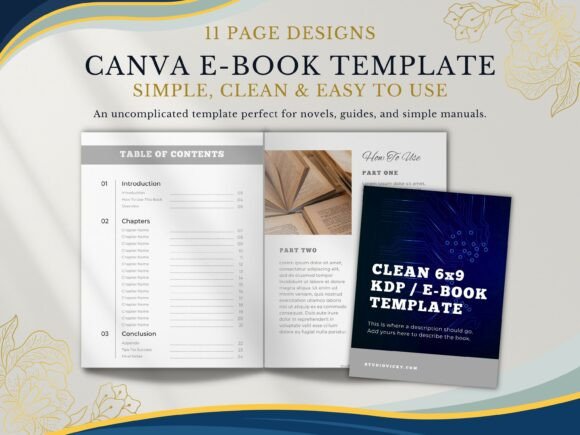
At its core, a Canva Book Template for KDP 6x9 E-Book is a collection of professionally designed pages inside the Canva platform. The "6x9" refers to the standard trim size common for many print and digital books. The package typically includes essential sections like a title page, introduction, chapter dividers, content pages, and an appendix. The key feature is that every element—text boxes, fonts, colors, and image placeholders—is fully editable. You are not locked into the sample content or style; you adapt it to your voice and brand. This is different from starting with a blank canvas or a generic word processor file, as it provides a visual framework that is already optimized for readability and professional presentation.
Why Different People Seek This Solution
The value of a pre-built ebook template shifts based on who is using it and what they hope to achieve. For a first-time author, the primary concern is often ease of use. The fear of complicated software or poor design can stall a project indefinitely. A template in Canva, a tool many are familiar with for social media graphics, lowers that barrier significantly. You can focus on writing your content, knowing the structure is sound.
For an entrepreneur or coach, the priorities might be speed and professional presentation. An ebook is often a lead magnet or a core product in a sales funnel. A clean, branded design builds credibility instantly. Instead of spending weeks learning design principles, they can have a polished asset ready in days, which has direct commercial value for audience growth and authority building.
Educators and content creators might evaluate the template through the lens of clarity and learning value. A well-structured template with clear chapter headings, ample white space, and logical flow helps communicate complex information effectively. The "How To Use This Book" page, for example, is a thoughtful inclusion that sets reader expectations, which is crucial for instructional content.
Matching the Template to Your Project and Skill Level
A beginner will likely appreciate the template as a learning tool. It demonstrates how to set margins, choose complementary fonts, and balance text with visual elements. By editing it, they gain practical design experience. The learning value is high, and the risk of producing an amateurish result is low.
An experienced user, perhaps a freelance writer or a small business owner with some design background, might see it as a time-saving accelerator. They may not need the basic guidance but will use the template to quickly test layouts for a new project or maintain consistency across multiple publications. For them, flexibility is key—can the template be easily stripped down or expanded without breaking the design?
The included pages serve different functions. The Title Page is your book's first impression. The Chapter Title Pages act as visual dividers, helping readers navigate. The main Content Page is where the real work happens; its text layout should be comfortable for extended reading on a screen. The Appendix and Tips for Success pages are strategic additions that add depth and practical utility to your final product, elevating it from a simple document to a comprehensive resource.
Practical Considerations and Use Cases
Imagine you are a freelance graphic designer creating a style guide for a client. Using this template, you can deliver a professional document that reinforces your client's brand, with all chapters logically organized. Alternatively, a hobbyist passionate about a niche topic, like vintage camera restoration, could use it to compile their knowledge into a sellable ebook. The template handles the formatting, allowing them to focus on the content of their passion.
A marketing professional might use it to create an internal training manual. The clean design ensures the material is taken seriously and is easy to follow. The long-term usefulness here is in the template's reusability; the same framework can be adapted for different topics as business needs evolve.
It is important to assess the template's reliability. Since it is built for KDP's 6x9 size, you avoid the common pitfall of uploading a manuscript with incorrect dimensions. However, you must still carefully follow KDP's formatting guidelines during the export process from Canva to ensure the final file meets all technical specifications.
Making Your Decision
Does a Canva Book Template for KDP 6x9 E-Book align with your goals? If you value a simple, clean, and easy-to-use starting point that prevents design overwhelm, it is a strong candidate. If your priority is maximum creative control from scratch, it might feel limiting. If you need to produce a high-quality ebook quickly for a business purpose, its speed and professional output are major advantages.
Consider your comfort with Canva. If you find it intuitive, you will edit the template with ease. If you have never used it, there will be a short learning curve, but it is generally gentler than professional design software. The goal is not to become a designer overnight but to leverage a well-crafted tool to present your ideas effectively. By evaluating your specific needs against the template's structure and features, you can determine if it is the right bridge between your manuscript and a published ebook.