Black Friday Planner Canva PACIFIC: Organize Your Sales Strategy
The chaos of the holiday shopping season often hits before the turkey is even cold. For small business owners, freelancers, and creative entrepreneurs, November represents a massive opportunity, but it also brings a significant risk of burnout. The difference between a successful campaign and a stressful scramble usually comes down to preparation. Enter the Black Friday Planner Canva PACIFIC, a comprehensive toolkit designed to bring order to the madness of Q4 sales events.
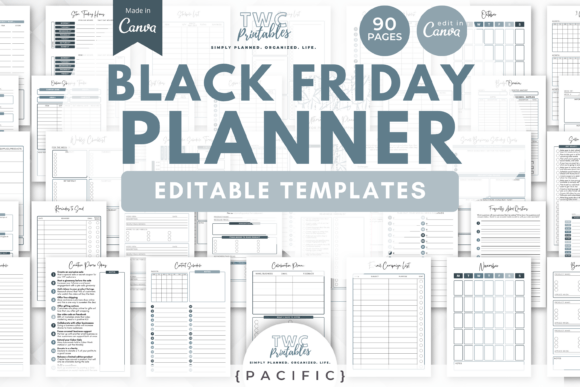
This isn't just a simple checklist. It is a robust set of 90 editable templates organized into two distinct planners: one for your personal shopping conquests and one for scaling your business revenue. Built on the aesthetic foundation of the "PACIFIC" theme, these templates offer a bright, modern, and calming visual environment—a stark contrast to the high-stress nature of the events they track. Whether you are planning a doorbuster deal for your digital products or hunting for the best tech gifts for your family, this system ensures you stay grounded and organized.
Decoding the PACIFIC Aesthetic and Dual-Planner System
What makes the Black Friday Planner Canva PACIFIC stand out in a sea of generic spreadsheets? It begins with the design philosophy. The PACIFIC theme utilizes a bright, airy color palette that reduces visual fatigue. When you are staring at numbers, dates, and inventory lists for hours, a clean interface helps maintain focus. However, because this is Canva-based, the design is entirely fluid. You aren't locked into a specific shade of blue or a particular sans-serif font. You can instantly change colors, move elements, adjust layouts, and reshape the entire visual language to match your personal brand or your business’s style guide.
The true power of this template set lies in its division of labor. It includes two massive planners, totaling 90 sheets, ensuring that your personal life doesn't bleed into your work life during the busiest month of the year.
The Business Planner (60 Sheets)
For the entrepreneur or creator, this section is the command center. It includes the Sales Tracker, which is versatile enough to handle Black Friday, Cyber Monday, and Small Business Saturday campaigns. You can track revenue streams, monitor conversion rates, and log customer interactions. It also features specific sheets for Sales Goals and Sales Logs, allowing you to set realistic targets and analyze your performance in real-time. This is where you move from "hoping" for a good month to engineering one.
The Personal Shopping Planner (30 Sheets)
Running a business requires a clear head, and financial stress is the enemy of creativity. The personal planner allows you to manage your own holiday spending. It includes Budget Overviews, Expense Trackers, and Gift Lists. By organizing your personal shopping—tracking online passwords, managing shipping statuses, and sticking to a budget—you free up mental bandwidth to focus on your customers and clients.
Creative Applications for Business Owners
While the templates are ready to use "out of the box," the most successful campaigns are those that leverage the flexibility of the tool. Here is how different professionals can adapt the Black Friday Planner Canva PACIFIC to fit their specific workflows.
For the E-Commerce Entrepreneur
If you run a product-based business, the Stockpile List and Inventory Tracker sheets are vital. Use them to map out your supply chain logistics weeks in advance. However, think beyond just tracking stock. Use the visual nature of Canva to embed images of your products directly into the planning sheets. This turns a dry spreadsheet into a visual lookbook for your sale, helping you see exactly how your offers stack up against one another visually.
For Digital Creators and Course Launchers
Digital products often involve complex launch sequences. You can repurpose the Plan of Attack sheets to outline your email marketing schedule. Map out your "Early Bird" access, the "Main Event" launch, and the "Last Chance" follow-ups. Use the Sales Log to track not just revenue, but also lead magnet conversions. Because the templates are editable, you can color-code different segments of your audience or different product tiers to ensure your messaging is targeted and precise.
For Freelancers and Agencies
Service providers can use the planner to manage capacity. If you are offering a limited-time discount on retainers or design packages, use the Sales Goal sheets to determine how many new clients you need to sign to hit your revenue targets without overbooking your schedule. The Shopping List can be repurposed as a "Resource List" to track software licenses or assets you need to purchase to fulfill client work during the rush.
Streamlining the Customer Experience
A well-organized backend leads to a seamless frontend experience. When you use the Black Friday Planner Canva PACIFIC to its full potential, your customers benefit from your preparation.
For example, the Cyber Sale Tracker allows you to monitor which promotions are performing best. If you notice a specific bundle isn't resonating, you can pivot your marketing copy mid-campaign. Conversely, if a product is selling out faster than expected, you can update your website to reflect scarcity, creating urgency. This level of agility is only possible when your data is organized and accessible.
Furthermore, the inclusion of Online Shopping Trackers and Shopping Lists in the personal section ensures that your own holiday shopping is handled efficiently. When you aren't worried about missing a shipping deadline for a family gift, you can be fully present in your business community, engaging with followers and answering customer queries with a clear mind.
Maximizing the Canva Interface
The choice to build this planner in Canva is a strategic one, offering advantages that traditional spreadsheet software cannot match. Canva is a visual-first platform, which makes the planning process more intuitive and engaging.
Brand Consistency: You can upload your brand kit—logos, hex codes, and fonts—directly into Canva. Applying these to the Black Friday Planner Canva PACIFIC templates takes seconds. This ensures that if you ever need to share a planning sheet with a team member, a virtual assistant, or a collaborator, it looks professional and on-brand.
Collaboration: Canva allows for real-time collaboration. If you have a team, multiple people can update the Sales Tracker or Inventory Lists simultaneously. This eliminates the version control nightmares often associated with email attachments or local files.
Accessibility: With a free Canva account, you can access these templates from any device with a browser. This means you can check your Sales Goals from your phone while at a meeting or update your Expenses from a tablet while watching TV. The barrier to entry is low, making it easy to stay consistent with your tracking.
Practical Tips for Execution
Having the tool is only half the battle; using it effectively is what drives results. Here are practical recommendations for getting the most out of this template set:
- Color-Code Your Status: Use the color editing features to create a traffic light system within your Sales Log. Green for campaigns that are live and performing well, yellow for those that need monitoring, and red for those that require immediate attention.
- Duplicate and Archive: Don't overwrite your original data. Before making major changes to a tracker, duplicate the page. This creates an archive of your previous week's data, allowing you to compare performance over time.
- Integrate with Password Managers: While the Online Shopping Passwords sheet is convenient, ensure you are also using a secure password manager for sensitive data. Use the sheet to track which accounts you have created for specific retailers, rather than storing highly sensitive passwords in plain text.
- Set Weekly Reviews: Schedule a 30-minute block every Sunday to review your Budget Breakdown and Plan of Attack. This habit ensures you catch discrepancies early and adjust your strategy before the week gets away from you.
Preparing for the Long Game
The Black Friday Planner Canva PACIFIC is designed for the immediate rush of the holiday season, but its utility extends far beyond November. The structure of the planner—tracking goals, logging sales, and managing budgets—is the foundation of sound business management year-round.
You can repurpose the Business Planner for your New Year’s launch, your Spring sale, or a mid-year clearance. The templates are a vehicle for your data; the data changes, but the need for organization remains constant. By mastering this system now, you are building habits that will sustain your business growth through every quarter, not just the fourth one.
Ultimately, this template set is about control. It puts you in the driver's seat of your finances, your inventory, and your time. In the high-stakes environment of Black Friday and Cyber Monday, that control is your most valuable asset.