Transform Your Photos into Art: Mastering the Watercolor Frames Photoshop Effect
In an era dominated by high-definition digital photography, there is a growing yearning for the tactile, imperfect beauty of traditional art forms. We see it in the resurgence of film photography, the popularity of hand-lettering, and the desire for designs that feel personal and crafted. This is where the Watercolor Frames Photoshop Effect emerges as a powerful creative tool. It bridges the gap between the precision of digital imaging and the soulful, organic aesthetic of a hand-painted watercolor, allowing anyone to infuse their photographs with artistic charm.
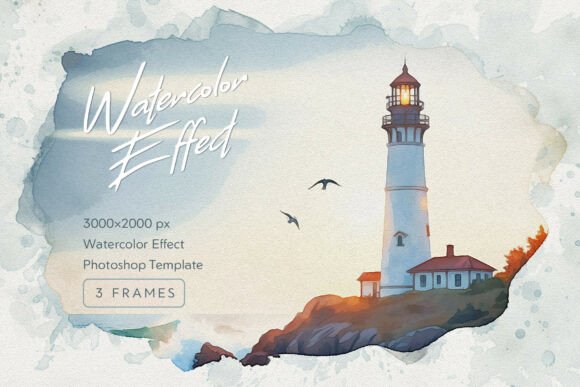
But what exactly does this effect entail, and how does it work? At its core, it is a specialized digital toolkit designed to replicate the complex and often unpredictable behavior of watercolor paint on paper. Unlike a simple filter that might just overlay a texture, a high-quality watercolor effect simulates the interaction between pigment and water. It captures the delicate feathering of color at the edges, the subtle blooms where pigment pools, and the way the white of the paper shines through transparent washes. The "frames" aspect means these artistic bleeds are structured to elegantly border your photograph, drawing the viewer's eye inward toward the subject while surrounding it with a soft, atmospheric halo.
Understanding the Anatomy of a Digital Watercolor Effect
To appreciate the value of such a toolkit, it helps to understand its components. A truly realistic digital watercolor effect is not a single layer but a complex assembly of textures, masks, and blend modes working in harmony. The foundation is often a high-resolution scan of real watercolor paper, capturing every fiber, tooth, and subtle imperfection. This provides the authentic surface upon which the "paint" sits.
Upon this paper texture, the effect builds layers of color and bleed. Key characteristics it replicates include:
- Pigment Bleeds: These are the soft, irregular edges where color seems to wander beyond a crisp boundary, a hallmark of wet-on-wet or wet-on-dry painting techniques.
- Granulation: The settling of pigment particles into the valleys of the paper texture, creating a subtle, speckled appearance within color fields.
- Paint Rings & Dried Edges: The darker outline that forms as a wash dries, adding depth and definition to shapes.
- Paper White Preservation: The strategic use of the paper's white as a highlight, which is crucial for achieving a luminous, transparent look.
A professional-grade template, such as one offering a 2000 x 3000 pixel resolution at 300 DPI, ensures these intricate details are preserved without pixelation, making the effect suitable for both digital displays and high-quality print projects.
The Power of Non-Destructive Editing with Smart Objects
Perhaps the most significant feature for any designer or photographer is the use of Photoshop Smart Objects. This is the engine that makes the effect both powerful and flexible. A Smart Object is essentially a container within your Photoshop file that holds your original image data. When you place your photo into this Smart Object layer, the watercolor frame effect is applied to it automatically.
The magic of this non-destructive workflow is immense. You can double-click the Smart Object at any time to open and edit your original photo—adjusting its color, contrast, or even swapping it out entirely. When you save that change, the watercolor frame effect updates instantly around the new image. This means you can experiment endlessly without ever damaging your original file or having to reapply complex effects from scratch. It transforms a potentially hours-long manual painting process into a swift, professional, and endlessly revisable workflow.
Practical Applications: Where Art Meets Purpose
The true value of the Watercolor Frames Photoshop Effect lies in its versatility. It’s not just a novelty; it’s a solution for creating specific emotional responses and aesthetic cohesion across various projects.
For Personal Milestones and Celebrations
Imagine transforming a cherished wedding portrait into what looks like a bespoke watercolor painting for an invitation or a thank-you card. The soft, romantic bleed of color frames the couple in an ethereal glow, elevating a photograph into a piece of heirloom art. Similarly, it can be used for birth announcements, graduation portraits, or anniversary gifts, adding a layer of timeless elegance and personal touch that standard photo editing cannot achieve.
In Branding and Product Marketing
For businesses, especially those in artisanal sectors like bakeries, florists, boutique hotels, or handmade goods, visual branding is everything. Using this effect on product photography can instantly communicate values of craftsmanship, care, and authenticity. A product image framed with a watercolor bleed feels less like an advertisement and more like a lovingly curated piece of art, building an emotional connection with potential customers. It’s particularly effective for social media feeds, helping a brand stand out with a cohesive, sophisticated, and handcrafted visual identity.
In Education and Creative Projects
Educators and students can use this effect to create engaging presentations, report covers, or digital storybooks that capture attention and foster creativity. For digital artists and illustrators, it serves as a fantastic starting point or background element, allowing them to blend their own digital paintings with realistic watercolor textures seamlessly.
Dispelling the Myth: Digital Tools and Artistic Integrity
A common misunderstanding is that using such digital effects is "cheating" or lacks artistic merit. This view overlooks the nature of digital tools. Just as a photographer uses a lens to capture light or a painter uses a specific brush to create a stroke, a digital creator uses software tools to realize their vision. The Watercolor Frames effect is a sophisticated instrument, not an automatic art generator.
The artistry still lies in the user's choices: selecting the right photograph that will translate well into a watercolor aesthetic, adjusting the color balance and exposure within the Smart Object to complement the frame, and integrating the final image thoughtfully into a larger design. The effect provides the palette and the canvas; the creator still directs the composition. It democratizes a complex artistic style, allowing more people to explore and communicate through the beautiful language of watercolor.
Getting Started and Maximizing the Effect
For beginners, the process is designed to be intuitive. After opening the template in Photoshop, you simply double-click the designated Smart Object layer, paste or place your photo inside, save, and return to the main file to see your transformed image. Most kits include a help file for guidance.
To achieve the best results, consider these tips:
- Choose the Right Source Photo: Images with clear subjects, good contrast, and some soft edges (like portraits with blurred backgrounds or still-life objects) often yield the most beautiful results. Extremely busy or harshly lit images might compete with the frame.
- Experiment with Blending: After applying the effect, try adjusting the opacity of the frame layers or experimenting with Photoshop’s blend modes (like Multiply or Soft Light) to fine-tune how the watercolor interacts with your photo.
- Embrace the Texture: Don’t fight the grain and texture of the paper. It’s a key part of the aesthetic. Let it add character to your image.
- Use for Focal Points: Apply the effect to draw attention. It’s perfect for hero images on websites, featured social media posts, or the central element of a printed piece.
In conclusion, the Watercolor Frames Photoshop Effect is more than just a set of templates. It is a gateway to a hybrid artistic practice that honors traditional techniques while harnessing the power of digital editing. It allows photographers, designers, and creators of all levels to add a layer of soulful, handcrafted beauty to their work, transforming ordinary digital files into pieces that feel personal, timeless, and deeply artistic. In a world saturated with crisp digital perfection, this effect offers a welcome and elegant touch of the human hand.