Choosing the Right 4th of July American Flag Tshirt Design for Your Projects
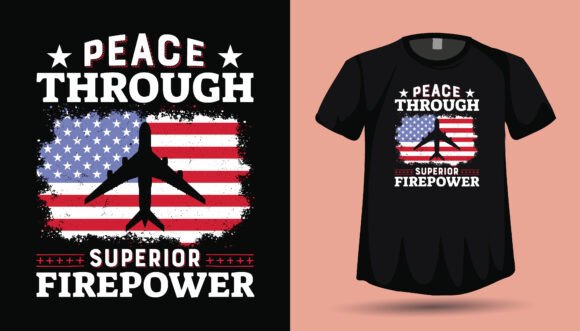
As Independence Day approaches, the demand for patriotic merchandise skyrockets. For creators, small business owners, and hobbyists, having a high-quality 4th of July American Flag Tshirt Design is not just about celebrating the holiday; it is a critical business asset. However, many creators rush into purchasing or downloading designs without fully understanding the technical requirements or licensing terms. This oversight can lead to wasted time, subpar products, and frustrated customers.
The file package described—containing PNG, SVG, and EPS formats—is a versatile toolkit intended for everything from T-shirts and hoodies to vinyl decals and mugs. While the promise of "high-quality transparent PNG" and "scalable vector files" sounds straightforward, the devil is in the details. To truly succeed in the print-on-demand (POD) space or physical crafting, you must look beyond the preview image. A design that looks great on a screen often fails in production due to resolution issues, color mismatches, or improper file preparation. Here is how to avoid those pitfalls and make the most of your patriotic designs.
Understanding File Formats: Why the Wrong Choice Ruins Quality
One of the most common mistakes beginners make is ignoring the specific use-case for each file format. When you download a 4th of July American Flag Tshirt Design, you are often given a bundle of files, but using the wrong one for your specific machine or printer can result in pixelation or cutting errors.
The PNG Trap
The listing mentions a "High-quality Transparent PNG 4500px 5400px." For many, this seems massive, but context matters. If you are planning to print a large back print for a hoodie, this resolution is excellent. However, if you are using this for print-on-demand services that require specific DPI (dots per inch) settings, you need to do the math. A 4500px wide image is only 15 inches wide at 300 DPI. If you try to stretch this image beyond that size for a blanket or large poster, you will encounter blurriness.
Better Approach: Always check the resolution requirements of your specific printer or POD platform before buying. If you are working with heat transfer vinyl (HTV) or a Cricut machine, a PNG is often sufficient for "Print then Cut," but ensure your machine's software can handle a file of that size without lagging. For engraving or laser cutting, the PNG is essentially useless—you need the vector data.
Vector Files: SVG vs. EPS
The bundle includes SVG and EPS files. These are the workhorses for scalability. An SVG (Scalable Vector Graphics) file is the standard for cutting machines like Cricut and Silhouette. An EPS (Encapsulated PostScript) is the industry standard for professional graphic designers using software like Adobe Illustrator or CorelDRAW.
A frequent misunderstanding is that these files are interchangeable. While modern software is getting better at cross-compatibility, an EPS file often contains complex data that a basic cutting machine software might misinterpret, leading to jagged cuts or missing layers. Conversely, an SVG might lose specific gradient data when opened in older professional print software.
Avoiding the "One Design Fits All" Mistake
The versatility of a modern 4th of July American Flag Tshirt Design is its biggest selling point, but it is also where creators make poor decisions. A design optimized for a cotton T-shirt (Direct-to-Garment printing) requires a different file preparation than a design for a vinyl decal on a car window.
Color Separation and Complexity
Patriotic designs often feature distressed textures, intricate flag waving effects, and multi-layered text. If you are using a heat press with vinyl, you cannot simply cut a distressed design with fifty tiny holes and expect it to weed easily. You will spend hours picking out vinyl fragments, which destroys efficiency and profit margins.
Practical Advice: Before cutting, examine the vector file in your editing software. If the design is too complex for vinyl, look for a "simplified" version within the file package, or use the "Weld" and "Simplify" tools in your software to reduce nodes. For screen printing, ensure the design is separated into spot colors if necessary, rather than relying on CMYK process printing which can be expensive for small runs.
Legalities and Licensing: The Overlooked Detail
Perhaps the most critical area where creators make mistakes involves licensing. Just because you bought the 4th of July American Flag Tshirt Design does not mean you own the copyright to the image. You are typically purchasing a license to use the design on end-products.
Many designers on marketplaces offer "Personal Use" licenses, while others offer "Commercial Use" licenses. If you are selling T-shirts on Etsy or at a local craft fair, you absolutely need a commercial license. Ignoring this can lead to your shop being shut down or legal action.
What to Check: Read the license agreement included in the download or on the product page. Does it allow for Print-on-Demand services (like Printful or Printify)? Some licenses restrict the number of physical items you can produce (e.g., up to 500 units). If you plan to scale your business, ensure the license allows for unlimited production or purchase an extended license if available.
Technical Preparation for Flawless Application
Once you have the correct files and the right license, the next hurdle is application. A beautiful design can be ruined by a bad print job.
Mirror Imaging for Heat Transfer
This is a classic rookie error. When using Iron-on Transfers or HTV, you must mirror the image before cutting or printing. Because the design is applied face-down onto the fabric, a non-mirrored image will result in a backwards flag and text. While this sounds obvious, the stress of a production run often leads to this simple oversight.
Color Management
Monitors emit light (RGB), while printers use ink (CMYK). A vibrant neon red on your screen might print as a dull brick red on fabric. The 4th of July American Flag Tshirt Design relies heavily on specific shades of red, white, and blue.
Better Approach: If color accuracy is vital, print a small test swatch on your specific material before running the full batch. If you are outsourcing to a POD service, order a sample. Do not trust that the digital preview matches the physical reality. Adjust your saturation levels in your editing software if the colors look washed out.
Maximizing the Value of Your Download
The prompt encourages you to "Drop a love favorite" and follow for updates, which is a smart move for staying on trend. However, value also comes from how you manage the files once downloaded.
Organization is Efficiency
Downloading a zip file and leaving it in your "Downloads" folder is a recipe for disaster. Create a specific folder structure for your holiday assets. A folder named "4th of July Assets" should have subfolders for "T-Shirt Designs," "Decals," and "Source Files." When a customer orders a mug, you shouldn't have to spend 10 minutes hunting for the right PNG.
Customization for Uniqueness
The market is flooded with generic patriotic designs. To stand out, use the SVG or EPS files to customize the artwork. Change the font, alter the color scheme (perhaps a vintage sepia tone or a neon pop-art style), or combine elements from different files. By editing the vector file, you create a unique product that doesn't look like every other shop's inventory.
Conclusion: Smart Selection Leads to Better Sales
Selecting a 4th of July American Flag Tshirt Design is more than just finding a pretty picture. It involves understanding the technical specifications of your production method, respecting licensing laws, and preparing your files correctly to avoid production errors. By taking the time to verify file dimensions, test color outputs, and organize your assets, you ensure that your final product—whether it is a hoodie, a sticker, or an invitation—looks professional and sells well. Treat your design files as the foundation of your product, and the rest of the production process will follow smoothly.