Book Mockup for Aplus Content: Transforming Your KDP Listing
The Power of Visual Storytelling in Self-Publishing
In the competitive landscape of Amazon Kindle Direct Publishing (KDP), a compelling narrative inside your book is only half the battle. The exterior presentation—how your book appears to a potential buyer scrolling through search results—is the critical first impression that dictates whether a click turns into a sale. For self-publishing authors, particularly those navigating the nuances of low-content books like journals, planners, and sketchbooks, as well as high-content authors, the visual marketing strategy is paramount. This is where the concept of a Book Mockup for Aplus Content becomes an indispensable asset.
Aplus Content (formerly known as Enhanced Brand Content) is Amazon’s built-in feature that allows brand-registered sellers and authors to modify the product description area of their listings with rich media. It is the digital equivalent of a bookstore display table, allowing you to showcase high-resolution images, comparison charts, and detailed text placements that go far beyond the standard product description. However, creating these graphics from scratch requires advanced design skills and software. The introduction of specialized templates, specifically designed as Book Mockup for Aplus Content, democratizes this process, allowing authors to produce professional-grade marketing materials without a steep learning curve.
Deconstructing the Canva Template Experience
The modern author’s toolkit has shifted heavily toward accessible cloud-based design platforms. Among these, Canva stands out for its user-friendly interface and drag-and-drop functionality. A dedicated Book Mockup for Aplus Content template set leverages this platform to streamline the creation of Amazon-specific assets. Unlike generic mockups found on stock photo sites, these templates are engineered with Amazon’s strict guidelines and aesthetic standards in mind.
When you acquire a high-quality Book Mockup for Aplus Content, you are not just receiving a static image; you are receiving an interactive design file. The process is intuitive. Authors simply upload their book cover and interior spreads into the Canva editor. The templates are pre-configured with realistic shadows, lighting effects, and custom frames that mimic the physical presence of a book. This is particularly vital for 8.5x11 hardcover books, a standard size for notebooks and activity books, where the texture and binding of the spine need to look tangible to the viewer. The ability to instantly change the background color or text allows for rapid iteration, ensuring the final output matches the author's specific branding.
Strategic Applications: Beyond the Amazon Listing
While the primary function of a Book Mockup for Aplus Content is to optimize the Amazon product detail page, its utility extends far beyond the marketplace. In today’s digital ecosystem, an author must be a multi-channel marketer. The same high-fidelity graphics used for Aplus Content are perfectly suited for social media engagement.
- Instagram and TikTok: Visual platforms thrive on aesthetics. A realistic mockup of a children’s book or a sketchbook can stop the scroll, offering a tangible preview of the product. These images work exceptionally well in carousel posts or as video thumbnails.
- Pinterest: As a visual search engine, Pinterest requires vertical, high-quality images. The specific module sizes included in professional mockup sets allow authors to create "pins" that drive traffic directly back to their Amazon listings.
- Facebook and Email Marketing: When running ads or sending newsletters, using a professional mockup lends credibility to the promotion. It signals to the customer that the product is polished and ready for purchase.
Furthermore, these templates are not limited to authors. Business owners creating corporate planners, educators designing curriculum workbooks, or artists compiling portfolios can utilize a Book Mockup for Aplus Content to visualize their final products before committing to a print run. It serves as a digital proofing tool that saves time and money.
Technical Specifications and Module Breakdown
Amazon’s Aplus Content system relies on specific image dimensions to ensure mobile responsiveness and desktop clarity. A comprehensive Book Mockup for Aplus Content package addresses this by providing templates in the exact pixel dimensions required by the platform. Typically, this includes three distinct module types:
- Standard Image Text (1940 x 600px): This wide, panoramic format is ideal for showcasing a book spread alongside a block of descriptive text. It is perfect for highlighting interior features, such as the quality of paper or the layout of a daily planner.
- Standard Image Header With Text (1940 x 1200px): This provides a taller canvas, allowing for a more immersive visual experience. Authors can use this to create a "hero image" that establishes the mood of the book, whether it is a serene journal or an energetic children's activity book.
- Square (600 x 600px): The square format is versatile and clean. It is often used for comparison charts or to display multiple books in a series side-by-side. Because it is square, it translates seamlessly to Instagram posts.
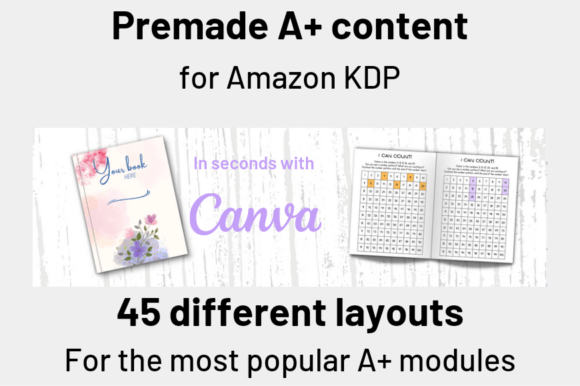
By providing 15 layouts for each of these modules, a Book Mockup for Aplus Content set offers 45 unique variations. This variety prevents "content fatigue," where all author listings look identical. It allows you to match the specific visual style of your book—be it minimalist, vintage, or bold—to the appropriate template.
Evaluating Suitability and Practical Expectations
When deciding to integrate a Book Mockup for Aplus Content into your workflow, it is helpful to assess the specific needs of your project. For low-content creators—those producing coloring books, logbooks, or diaries—the emphasis is often on the cover design and the quality of the interior pages. A mockup that highlights the thickness of the book (page count) and the lay-flat capability is highly valuable. Conversely, a high-content author writing novels or non-fiction may prioritize a mockup that focuses on the cover art and typography.
It is also important to manage expectations regarding the editing process. While Canva is user-friendly, authors should have their final cover file ready in high resolution (usually 300 DPI PDF or PNG) and interior screenshots cropped to perfection. The Book Mockup for Aplus Content provides the frame and the lighting, but the quality of the uploaded artwork determines the final result.
Consider the "realism" factor. The best templates use custom frames that provide realistic shadows and depth, avoiding the flat, "sticker-on-background" look common in amateur designs. This realism is crucial for building trust with the customer. When a viewer sees a Book Mockup for Aplus Content that looks like a photograph taken in a studio, they subconsciously assign a higher value to the product.
Conclusion: A Professional Standard for Modern Publishing
The days of relying solely on a text-based description to sell a book are over. The visual component of the sales funnel is now the primary driver of conversion rates. Using a Book Mockup for Aplus Content is no longer a luxury for graphic design experts; it is a standard practice for successful self-publishers. By utilizing these Canva templates, authors bridge the gap between a raw manuscript and a polished, market-ready product. Whether you are aiming to enhance your Amazon Aplus Content page or create a cohesive brand presence across social media, these mockups provide the professional edge necessary to stand out in a crowded marketplace.