A Practical Guide to the Simple Resume Template for Word and Google Docs
Creating a professional resume from scratch can be a surprisingly daunting task. The pressure to present your career history clearly and concisely, while also navigating the complexities of document formatting, often leads to frustration. For many, the primary challenge isn't deciding what to write, but how to present it in a way that is both aesthetically pleasing and compatible with modern applicant tracking systems. This is where a well-designed, straightforward template can provide immense value. The Simple Resume Template for Word and Google Docs is built on this very principle, offering a structured yet flexible foundation for job seekers.
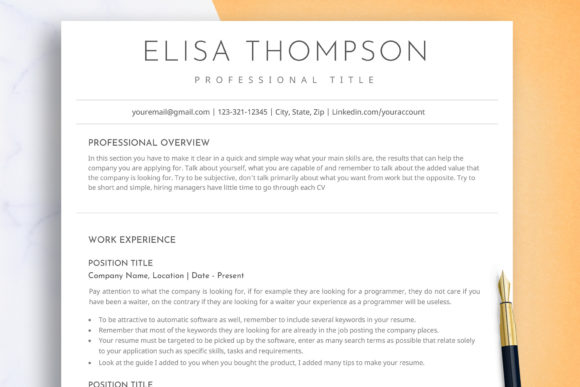
This template system is more than just a single file; it's a comprehensive suite of documents designed for practicality. At its core, it provides a clean, minimalist layout that prioritizes readability. The design intentionally avoids overly complex graphics, unconventional fonts, or dense formatting that can confuse both human recruiters and automated software. Instead, it offers a clear visual hierarchy, guiding the reader's eye from your contact information to your summary, experience, and skills. The distinctiveness of this approach lies in its commitment to function over flash, ensuring your qualifications are the main focus.
What's Included in the Template Package?
Understanding the full scope of what you receive is crucial when evaluating any template. This package is designed to be a complete toolkit for your job application process, providing consistency across all your documents. The inclusion of multiple file formats and document types ensures you are prepared for various application requirements.
- Microsoft Word and Google Docs Files: This dual compatibility is a significant advantage. You can work offline in the familiar environment of Microsoft Word or leverage the collaborative and cloud-based features of Google Docs, accessible from any device.
- 1-Page and 2-Page Resume Versions: Job seekers have different needs depending on their experience level. The single-page version is ideal for recent graduates or those with less than ten years of experience. The two-page version provides the necessary space for seasoned professionals with extensive work histories, projects, or publications.
- Matching Cover Letter and References Page Templates: A cohesive application package makes a strong impression. Using a cover letter and references page with the same design as your resume creates a professional and unified look, signaling attention to detail.
- A4 and US Letter Sizes: This practical inclusion removes a common formatting headache. Whether you are applying for jobs in the United States, Canada, or many other countries, the correct paper size is ready to go, preventing awkward printing or PDF conversion issues.
- Free Fonts and Extra Icons: The package comes with fonts that are free for commercial use, so you won't face licensing issues. The extra icons offer a subtle way to add visual interest to your contact information or section headers, though they should be used sparingly to maintain a professional tone.
Evaluating the Strengths and Ideal Use Cases
The primary strength of the Simple Resume Template Word Google Doc is its user-centric design. The layout is intentionally structured with ample white space and clear section breaks, making it quick and easy to insert your information. This "fill-in-the-blanks" approach reduces cognitive load, allowing you to focus on the content of your resume rather than wrestling with text boxes and alignment. For individuals who are not design-savvy or who simply want a reliable, no-fuss solution, this is a major benefit.
This template is an excellent fit in several common scenarios:
- Applying to Traditional Industries: Fields like law, finance, government, and academia often favor conservative, straightforward resumes. The clean, professional look of this template aligns perfectly with those expectations.
- Targeting Applicant Tracking Systems (ATS): Many companies use software to scan resumes for keywords before a human ever sees them. Simple, single-column layouts like this one are generally more reliably parsed by ATS software than those with complex tables, columns, or graphics.
- Job Seekers Valuing Speed and Simplicity: If you need to tailor your resume for multiple applications quickly, a template that is easy to modify is invaluable. The clear structure of this template makes it simple to swap out keywords or reorder sections to match a specific job description.
- Creating a Cohesive Application: With the included cover letter and references templates, you can ensure all your documents look consistent, which presents a more polished and organized image to a potential employer.
Considering Alternatives and Tradeoffs
No single solution is perfect for every situation. While the Simple Resume Template excels in clarity and ease of use, it's important to understand its tradeoffs compared to other options. The main decision often comes down to a choice between minimalist simplicity and creative expression.
For professionals in creative fields like graphic design, marketing, or user experience, a more visually dynamic resume might be expected. In these cases, templates that incorporate color blocks, custom typography, or portfolio-style layouts could be more appropriate. However, even in creative fields, it is often wise to have a simpler, ATS-friendly version of your resume on hand for online applications that are processed by automated systems.
Another alternative is building a resume from scratch. This offers ultimate control but demands a significant time investment and a good understanding of design principles and document formatting. For most people, the time saved by using a pre-formatted template like the Simple Resume Template Word Google Doc far outweighs the desire for complete customization. The template provides a solid foundation that can still be personalized; you can change fonts, colors, and move elements, but you start with a professional structure that you know works.
How to Determine if This Template is Right for You
Making the right choice involves assessing your personal needs, your industry's norms, and your application strategy. Ask yourself a few key questions to guide your decision.
First, consider the role and industry. Are you applying for a software engineering position, a teaching role, or a corporate accounting job? If the job description emphasizes skills and experience over visual flair, a simple, clean template is likely your best bet. If the role is for a "Visual Storyteller" or "Brand Designer," you might need something with more personality.
Second, evaluate your comfort level with design software. If the thought of aligning text boxes or choosing complementary colors causes anxiety, a structured template is a lifeline. This template is specifically designed to make the insertion of information quick and easy, leaving the right space for all your details. You can modify it to your pleasure and give it your personal touch without needing advanced skills.
Third, think about your application volume. If you are applying to dozens of jobs, efficiency is critical. A template that you can easily adapt for each application saves hours of work. The clear headings and logical flow of this template make it simple to scan and update.
Ultimately, the Simple Resume Template for Word and Google Docs is a tool designed for a wide range of job seekers who value professionalism, clarity, and efficiency. It provides a reliable framework that allows your qualifications to stand out, making it a practical and effective choice for navigating today's competitive job market. By providing a complete package of documents in universally compatible formats, it addresses the most common pain points of resume creation, letting you focus on what truly matters: landing the interview.